Restaurants, cafés & bars
Build a restaurant schedule that covers the floor without chasing the group chat.
Collect current availability across front of house, back of house, and the bar. Schedule's Up turns every answer into a draft you can check before the week goes out. Your staff use one private link, with no app or account required.
14-day full-access trial. No credit card required.
See the real workflow
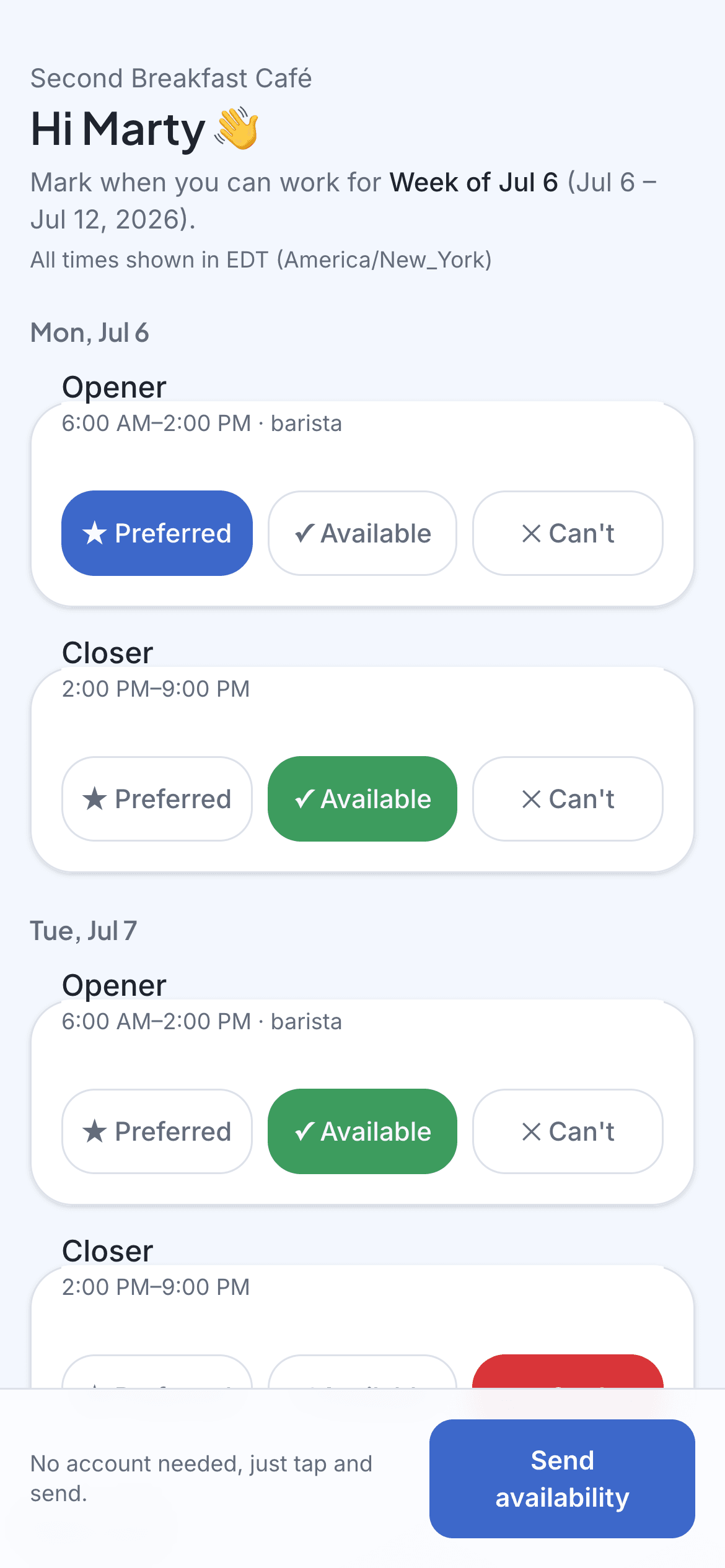
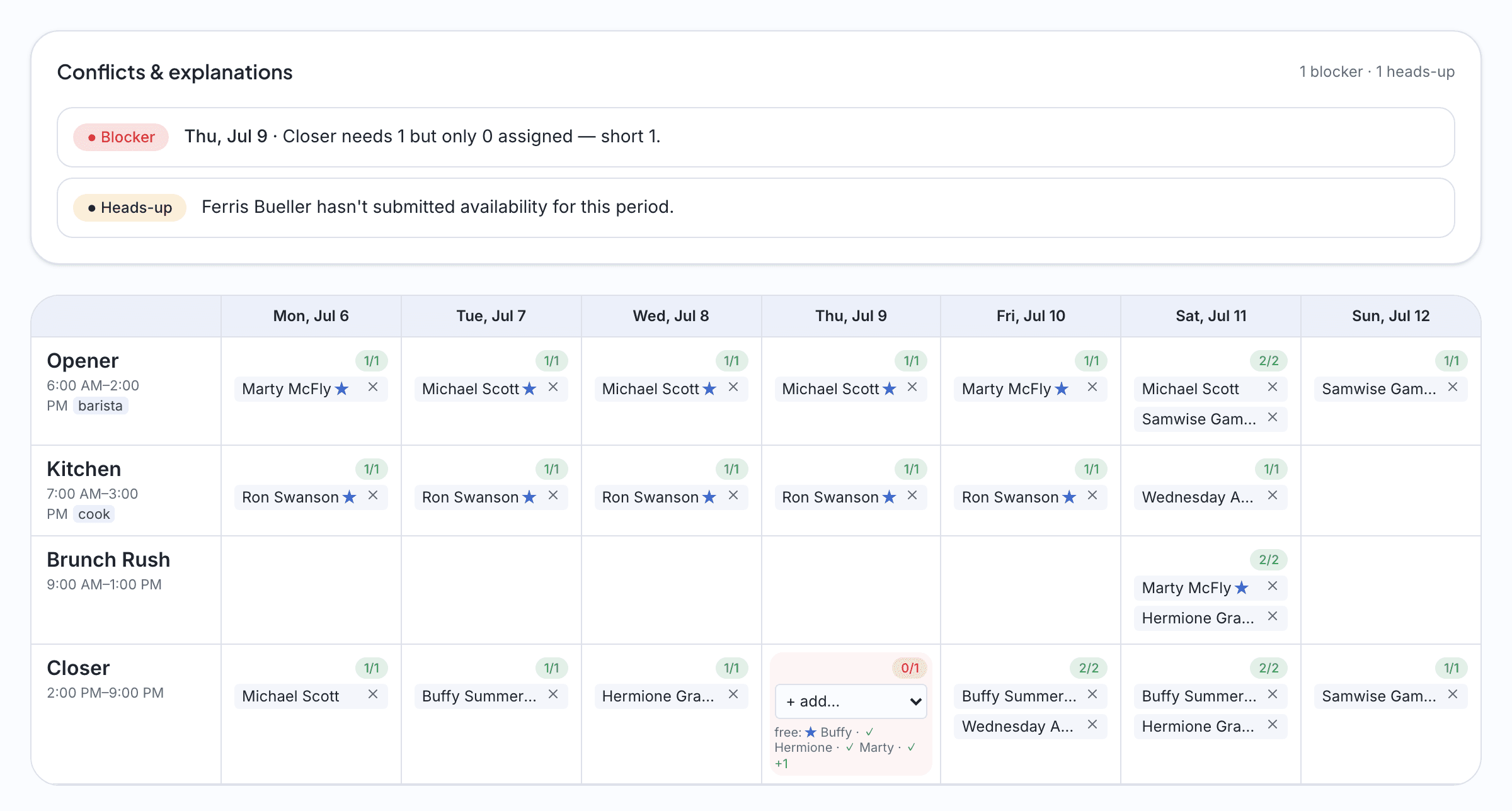
The employee answers on their phone. You see the draft and its conflicts before you publish.
These screenshots use the fictional Second Breakfast Café demo workspace.
Add a payment method at any point during the trial to continue after day 14. Without a payment method, your workspace becomes read-only at day 14. Your data is preserved for 30 days so you can reactivate.
Sound familiar?
The group chat is not a system
Availability arrives as texts, DMs, and a note taped to the register. By Thursday you're scheduling from memory, and someone always swears they told you about their exam.
Servers won't install workforce apps
High-turnover staff shouldn't need an account, a password, and a tutorial just to say when they can work. A link they can tap between tables is the most adoption you'll ever get.
Coverage isn't headcount
Friday dinner needs three servers, two cooks, and a bartender, not six warm bodies. The draft has to know the difference and tell you where the week is thin.
The schedule changes after it's posted
Swaps, call-outs, a private party on Saturday. When the week shifts, everyone needs the current version instead of a photo of last Tuesday's whiteboard.
How it works
Set the week's shifts
Lunch, dinner, opening, closing. Lay out the shifts and how many of each role every one needs, then save it as a template so next week takes minutes instead of an evening.
Text every crew member a link
Each server, cook, and bartender gets a private link by SMS or email. They tap available, preferred, or can't for each shift, from the bus or the walk-in or wherever they happen to be.
Publish a week that covers the floor
One click drafts the schedule against your coverage, flags the understaffed Friday dinner, and explains every conflict. Fix what needs fixing, hit publish, and everyone gets their shifts by text.
Imagine this
A week at a busy café
Imagine a café with fourteen staff across barista, kitchen, and weekend counter roles. In this example, availability links go out Thursday so the manager can review current answers before building the weekend. The draft makes a thin closing shift or missing role visible, and the manager can adjust the week before publishing it to everyone's phone. Nobody needs to download an app.
The questions we hear
- Do servers and kitchen staff need the app?
- There is no app. Everyone gets a private link by text or email and taps their availability in the browser. New hires are on the system the moment you have their number.
- Can I schedule front of house and back of house separately?
- Yes. Shifts carry roles, so a bartender isn't drafted onto the grill. Coverage is set per role per shift: three servers and two cooks for Friday dinner means exactly that.
- What happens when someone calls out after the schedule is posted?
- Update the week and republish. Everyone's schedule link always shows the current version, and you can push the update out by text so nobody's working from a screenshot.
Get this week sorted in an afternoon.
Build this week's schedule free14-day full-access trial. No credit card required.
No app for your staff. Just a link.