Salons, spas & fitness studios
Scheduling for salons, spas & studios. No more herding texts.
Ask stylists, instructors, and front-desk staff one clear question: what can you work this week? Schedule's Up turns their current answers across salons, spas, and studios into a draft you can review before publishing.
14-day full-access trial. No credit card required.
Add a payment method at any point during the trial to continue after day 14. Without a payment method, your workspace becomes read-only at day 14. Your data is preserved for 30 days so you can reactivate.
See the real workflow
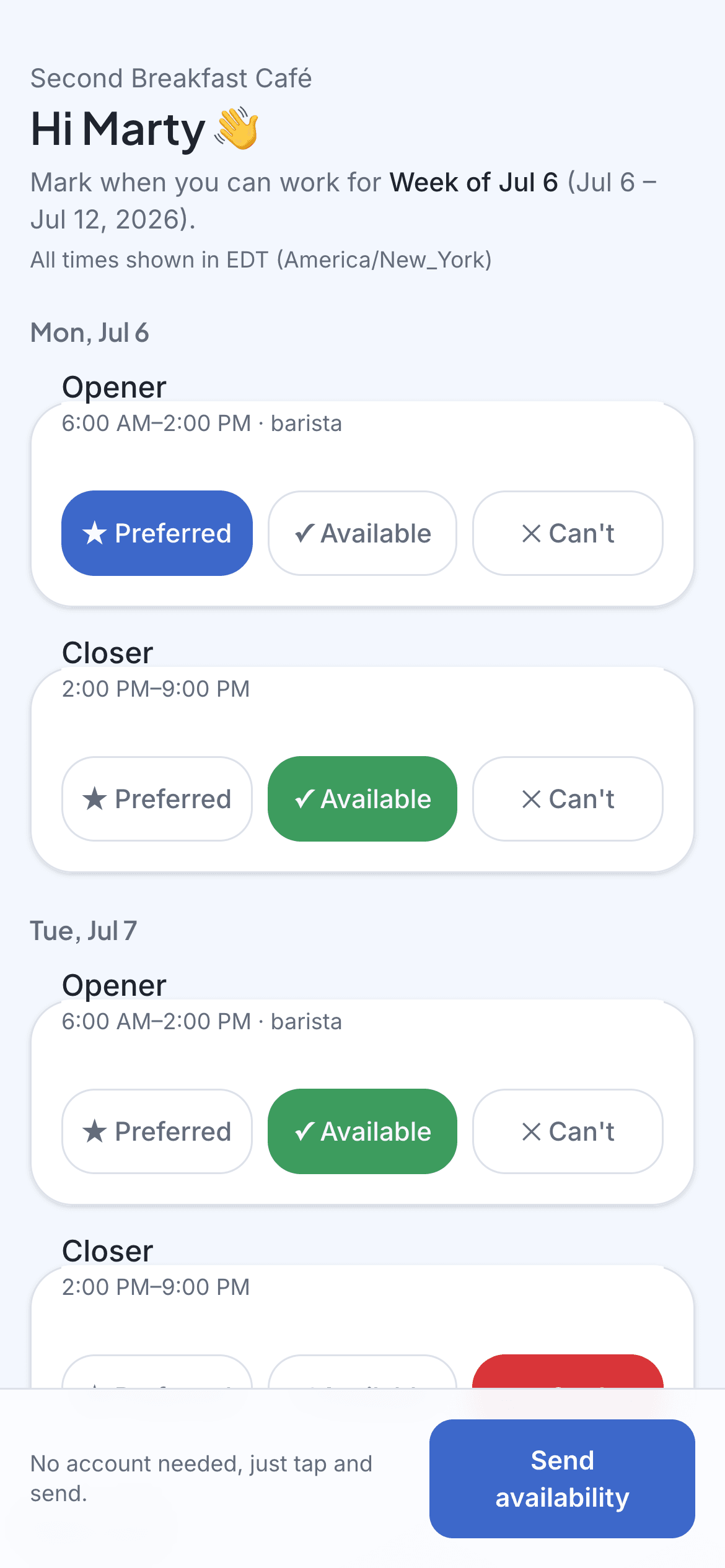
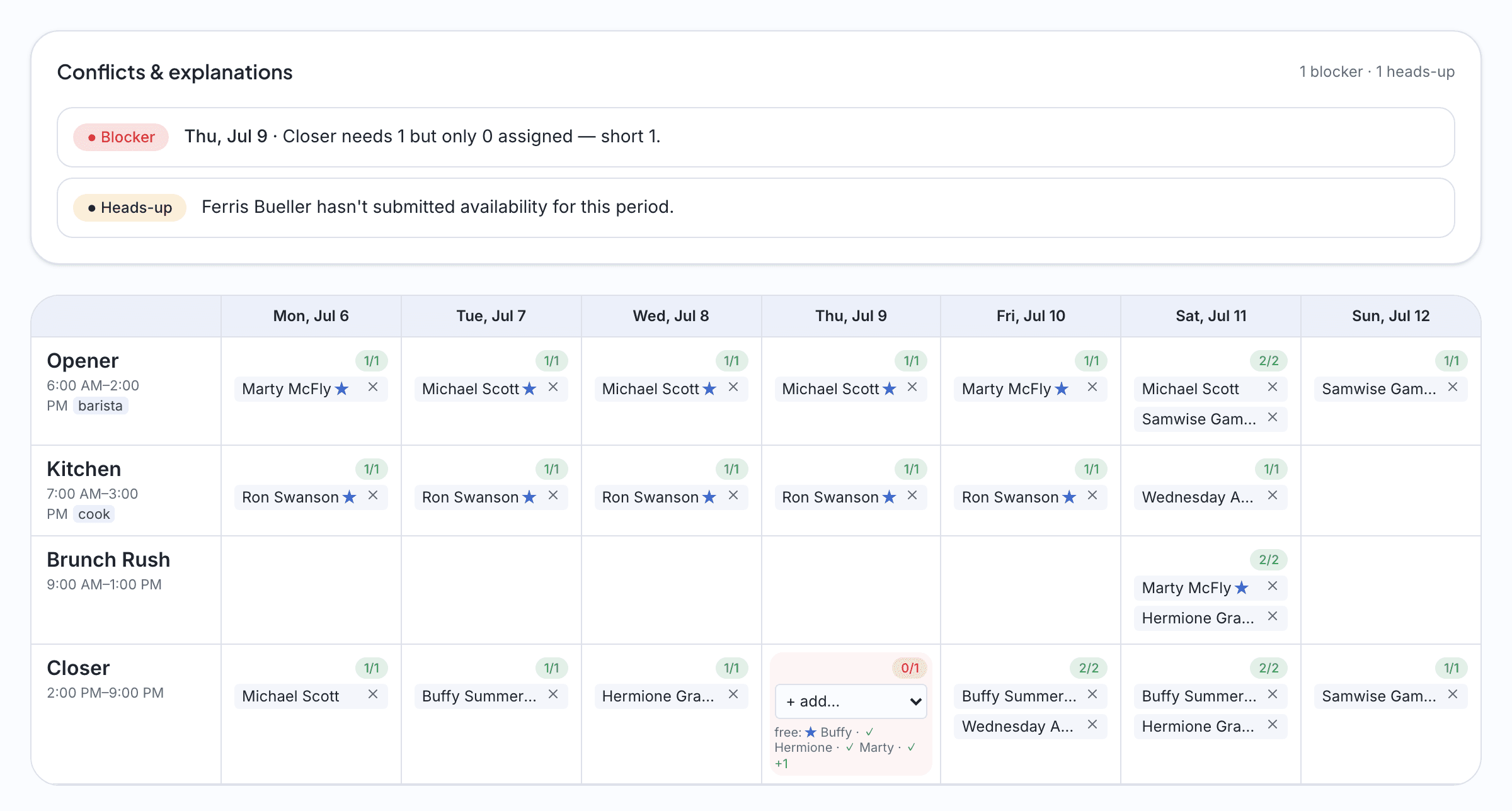
The employee answers on their phone. You see the draft and its conflicts before you publish.
These screenshots use the fictional Second Breakfast Café demo workspace.
Sound familiar?
Your staff work more than one place
Instructors and stylists split their weeks across studios and chairs. Their availability is real, specific, and different every week, and a recurring template can't capture it.
The front desk still has to be covered
Booked-out stylists don't answer the phone. Someone has to open, someone has to close, and someone has to be at the desk in between. That coverage doesn't happen by accident.
Group texts bury the answer
"Who can cover Saturday?" gets nineteen replies, three thumbs-up, and no schedule. You need answers attached to specific shifts instead of scattered across a thread.
Nobody wants another login
Your team lives in their booking app and their phone. Ask them to adopt workforce software for one schedule a week and you'll end up doing it yourself anyway.
How it works
Build the week's shifts
Desk shifts, floor coverage, class slots. Define what the week needs and how many people for each, then save it as a template. Most studio weeks rhyme.
One tap from every stylist and instructor
Each person gets a private link by text. They mark available, preferred, or can't around their other commitments. It takes thirty seconds between clients, with no account to create.
Publish a week that holds
The draft fills shifts from real availability, flags the uncovered Saturday desk, and explains every clash. You adjust, publish, and everyone gets their week by text.
Imagine this
A week at a small studio
Imagine a yoga studio with eleven instructors, most of whom also teach at other workplaces. In this example, one availability link goes out Sunday night and each instructor answers around their outside commitments. When the owner drafts the week, any class without an available instructor and any uncovered front-desk shift are visible before the schedule is published.
The questions we hear
- My instructors teach at other studios. Does that work?
- That's the core use case. Availability is asked fresh each week with a one-tap link, so people who split time across studios answer with their actual week instead of a stale recurring pattern.
- Can I schedule the front desk separately from stylists or instructors?
- Yes. Staff carry roles, and each shift asks for the roles it needs: front desk on every open and close, instructors on class slots. The draft flags any hole in that coverage.
- Do stylists have to create accounts?
- No accounts, no passwords, no app. A private text link is the entire employee experience. They tap availability, and later they tap to see the published week.
Get this week sorted in an afternoon.
Start free trial14-day full-access trial. No credit card required.
No app for your staff. Just a link.